
WebTracker

WebTracker Instructions / Help
Login
Webtracker is a web database that assists with the collection and management of data related to student nutrition programs. Webtracker is used by all schools in the South East Region, along with many other schools throughout the province.
This database allows program sites to enter monthly data reports, analyze year to date statistics, submit annual registration, manage funding, place food hub orders, submit receipts, provide feedback and access resources. You will find instructions and information on the various sections of the database on this website.
Each program site has been assigned a unique log in and password for Webtracker. Below is the login screen – click here to access Webtracker.
Once logged on, you will see your school’s dashboard.
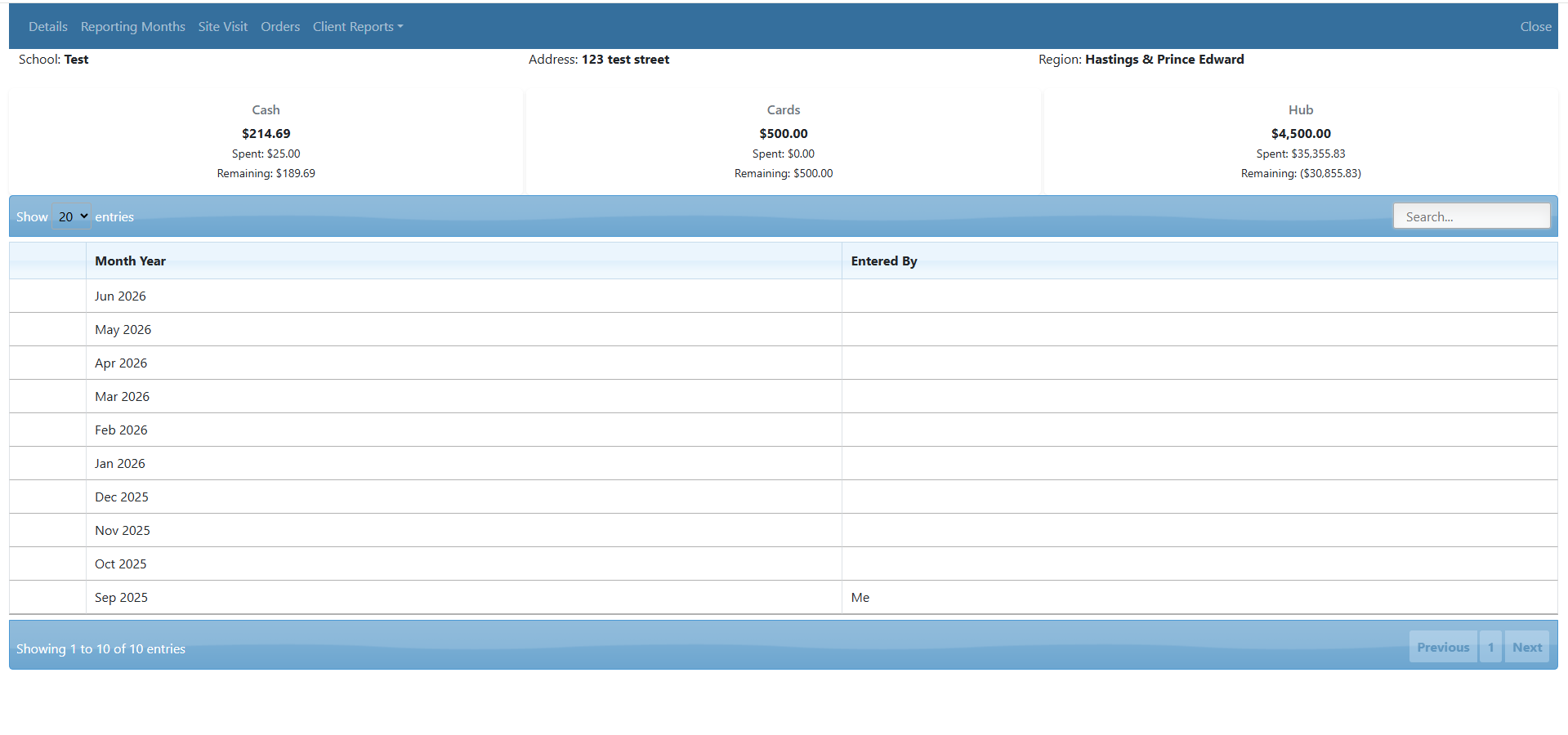
Along the top, under your school’s information, you will find financial information related to funding provided by Food for Learning. You may receive financial support from Food for Learning, and our partners, in three ways:
- Cash (once allocated, to be sent to your school)
- Grocery Cards (once allocated, to be mailed to your school)
- Allocated funds for food ordered through a food “Hub” (to be ordered on Webtracker and have food delivered to your school)
The bolded line at the top of the chart shows how much funding, in each category, was allocated to your school. The third line shows the balance remaining in each of those categories, which is still available to spend for the current school year.
Please submit receipts for any remaining balances in the cash and card sections.
On this screen you will also see tabs connecting you to all other sections of Webtracker, which will help you to manage information related to your student nutrition programs.
Client Reports
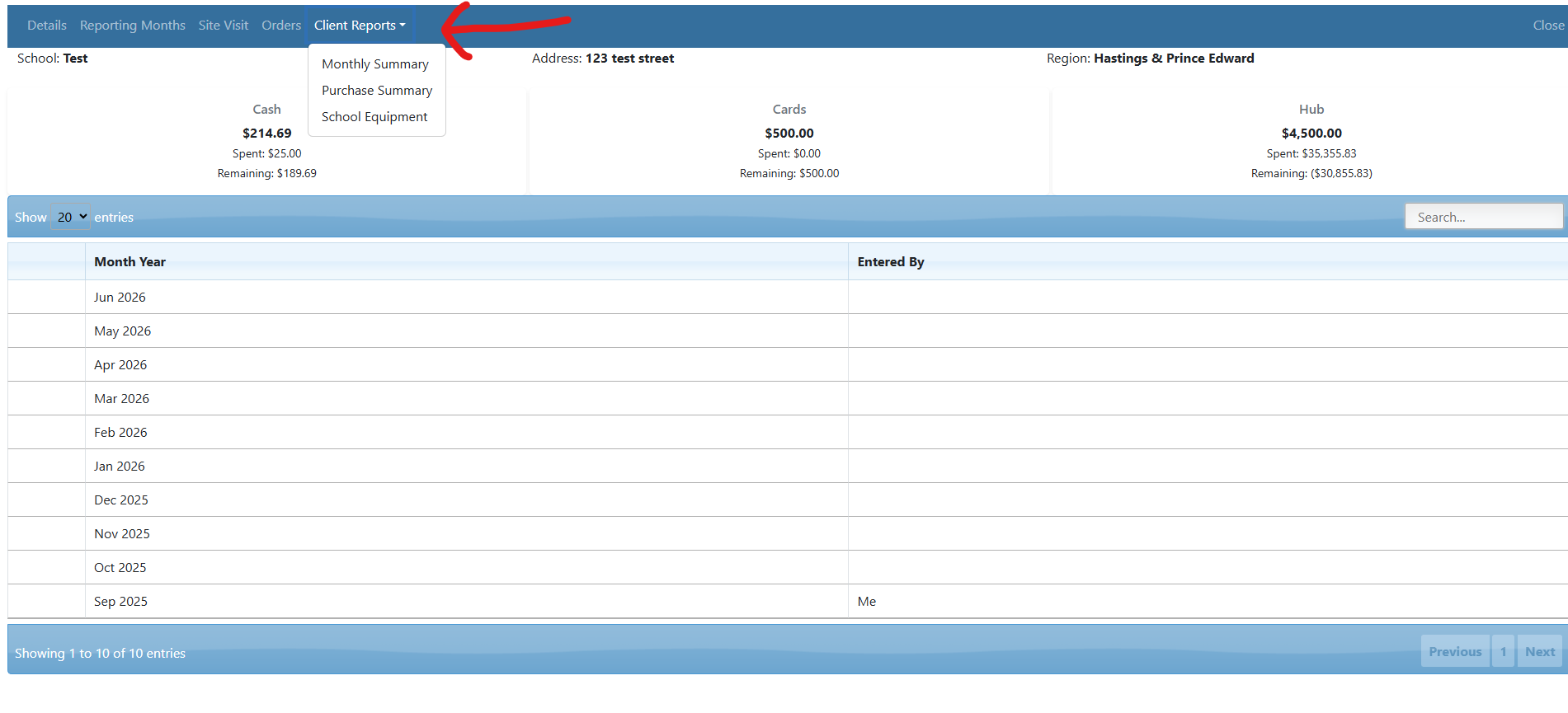
Click Client Reports.
Client Reports are broken down into three parts, each providing you will valuable year to date information. We recommend that you run this report frequently throughout the year to review and analyze information related to your student nutrition programs.
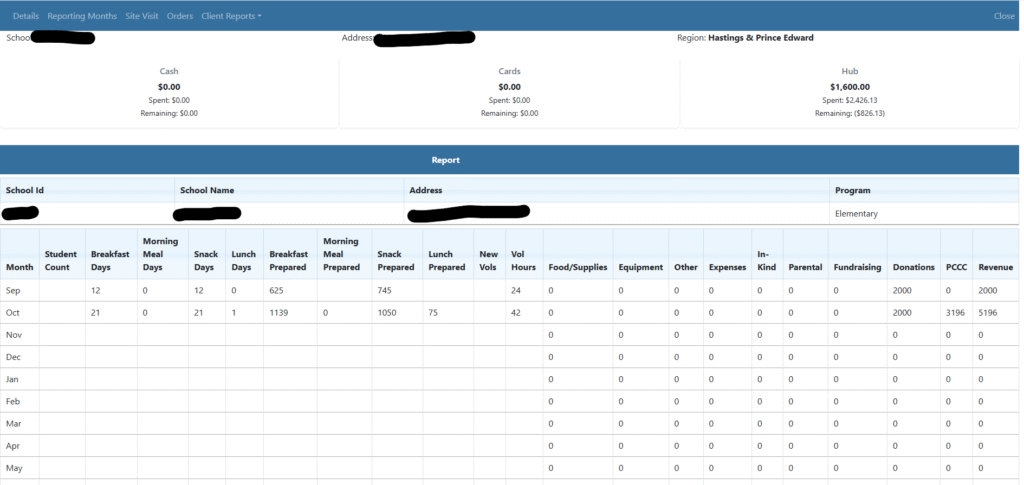
The first section, Monthly Summary, compiles all data entered into your monthly reports for the year. Rather than checking past months individually, you can review total meals served, evaluate overall expenses, and verify donations—all in one place.
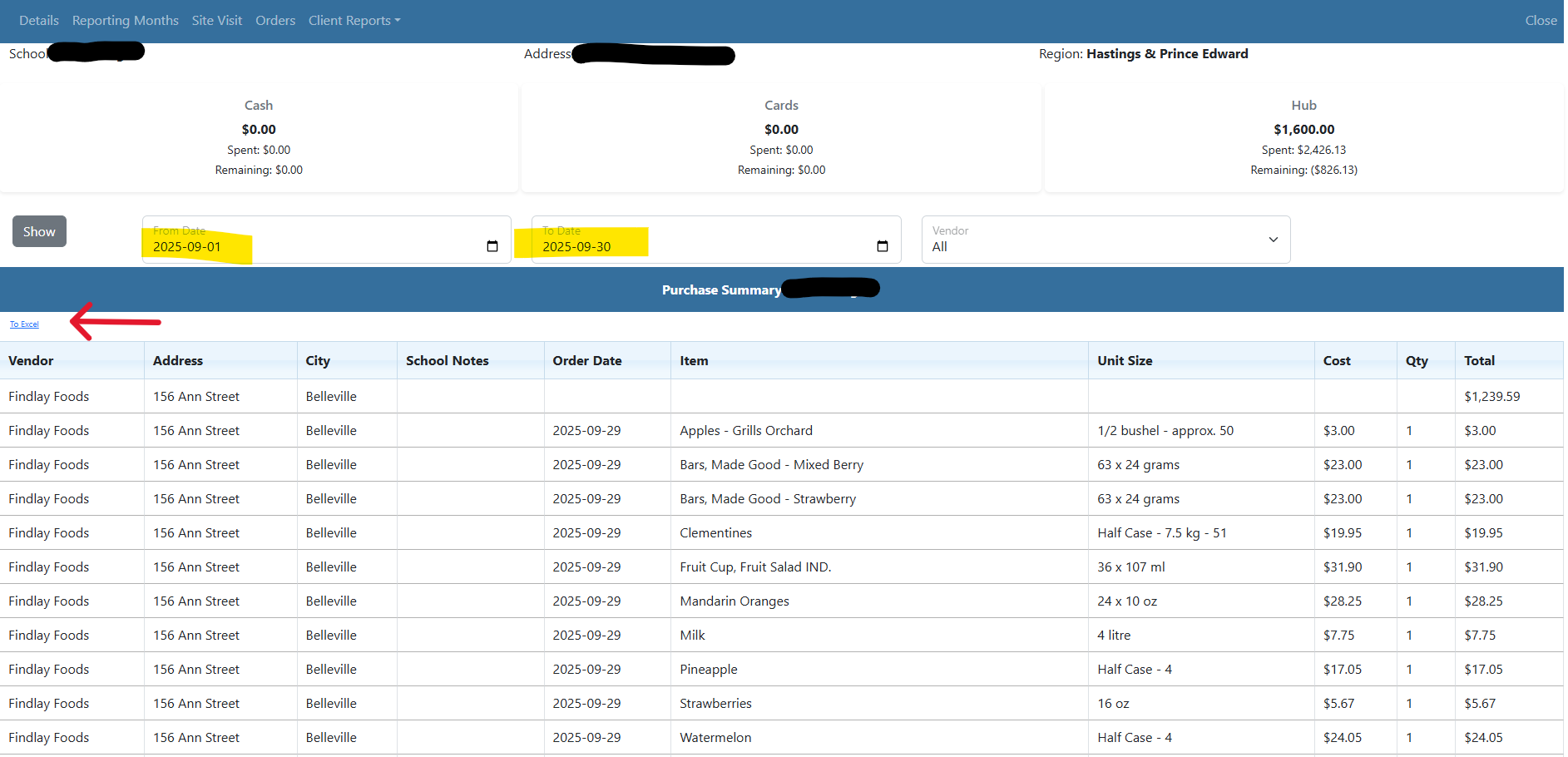
The second section, Purchase Summary, displays total program spending on food orders if you receive items from our Hub. After selecting a date range, you can view all purchases or filter by a specific vendor.
Click To Excel to export the report to a spreadsheet.
If you do not have Microsoft Excel, save the exported file to your computer, open Google Drive, click + New > File upload, and double-click the uploaded file to open and edit it in Google Sheets.
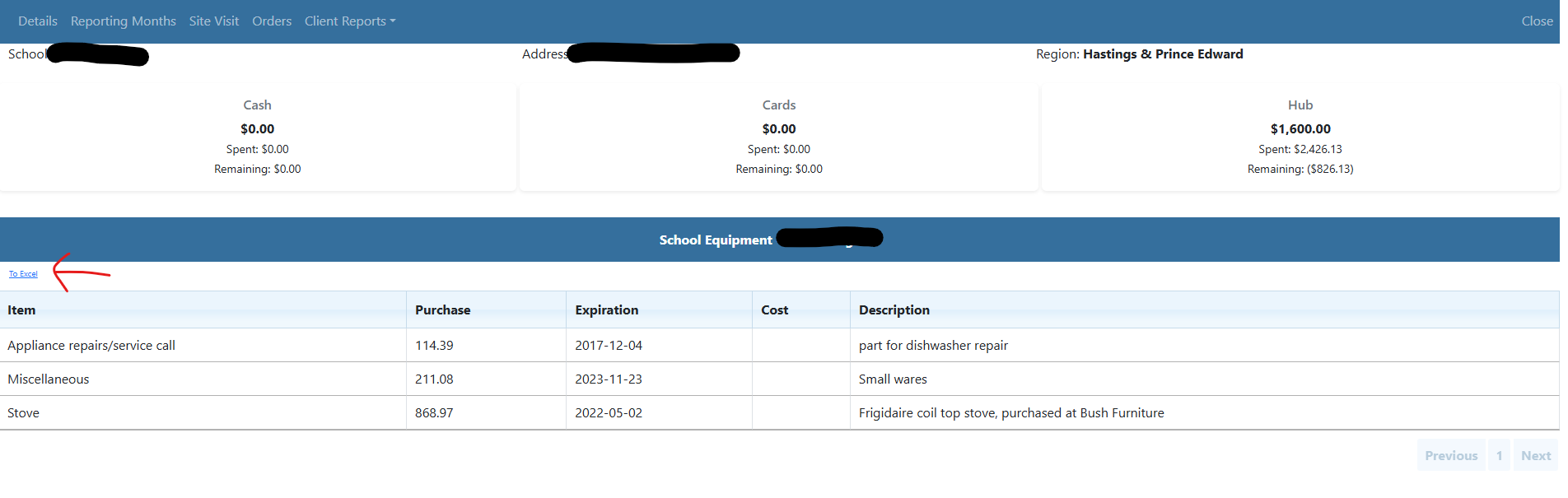
The third section, School Equipment, will show your equipment purchases.
Click To Excel to export the report to a spreadsheet.
If you do not have Microsoft Excel, save the exported file to your computer, open Google Drive, click + New > File upload, and double-click the uploaded file to open and edit it in Google Sheets.
Receipt Submission
Receipts are only required for cash and gift card purchases funded by Food for Learning. Items ordered directly through the food hub are tracked automatically and do not require receipts. Please note that any additional revenue (ie., community and parent donations) and expenses (e.g., items purchased with school account funds) should still be logged in your monthly reports.
-
Receipts Needed: Only for cash and gift card purchases funded through Food for Learning.
-
No Receipts Needed: Food hub orders (tracked automatically) and funds from other sources. (Note: Log additional revenue and expenses in your monthly reports.)
All receipts are to be submitted online through Webtracker. The Remaining balance for cash and cards notes the total amount of receipts that still need to be submitted this year.

How to submit your receipts:
- Scan and copy your months’ worth of receipts and save it, as a pdf file, on your computer
- Total all receipts (please double check your math – you would be surprised how many addition errors we find when reviewing receipts!)
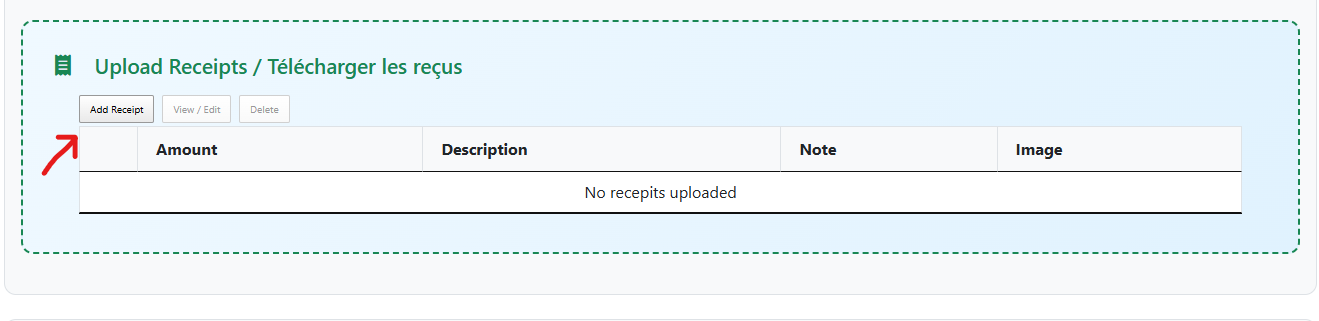
- Click the Add Receipt button in your Monthly Program Reporting Form
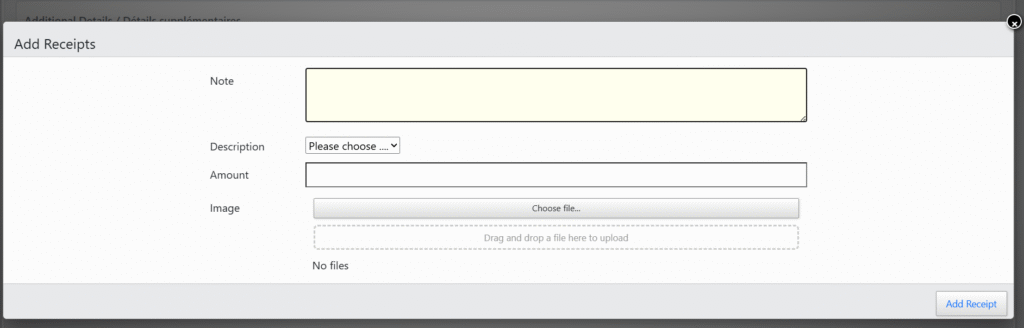
Each of the fields need to be filled in
- Note: We recommend using the note field to mention the month or a brief identifier to help you track your submissions. Please do not use this field to send messages to staff, as it is not monitored regularly. This section is strictly for your own reference.
- Description: you will select cash for the purchases made with payment or on store credit and select cards ONLY if you are redeeming a grocery store gift card that was provided by Food for Learning. Please note: if you are using a grocery card that you purchased with FFL funding do not enter it under cards, you would submit the receipts for the food purchased when redeeming that card and not for the card purchase itself.
- Amount: Please enter the total amount for each image uploaded.
- Image: Click Choose File to find the file on your computer where you saved the scanned copies of the pdf receipts you are submitting
- Click ‘Add Receipt’ to complete the process
Don’t forget to click Submit Report at the bottom of the Program Reporting Form, and Save at the top right corner of the to save your monthly Program Reporting Form.
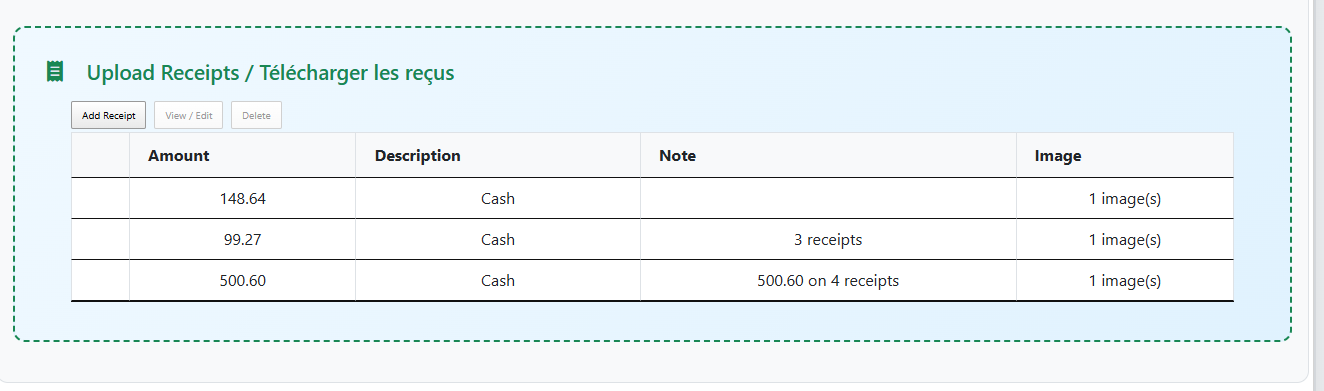
As receipts are submitted, you will see them listed.
Hub Orders
For those schools receiving their groceries through our food “Hub” (Findlay Foods deliveries directly to your school) this screen is how you place your weekly orders.
Select the Orders tab from your main screen. Then click the + sign to start your food order.
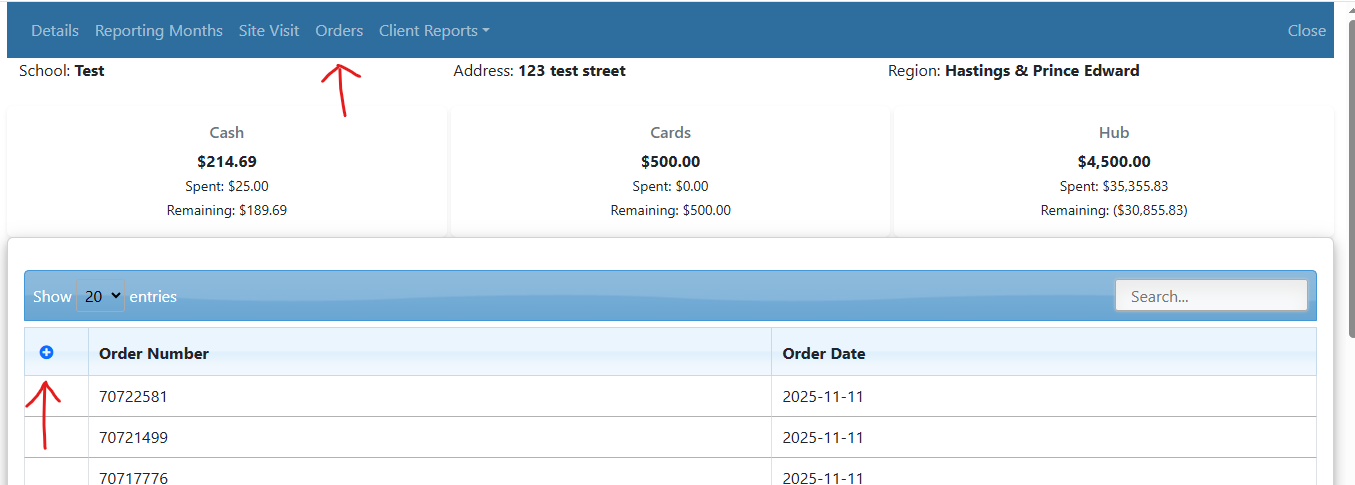
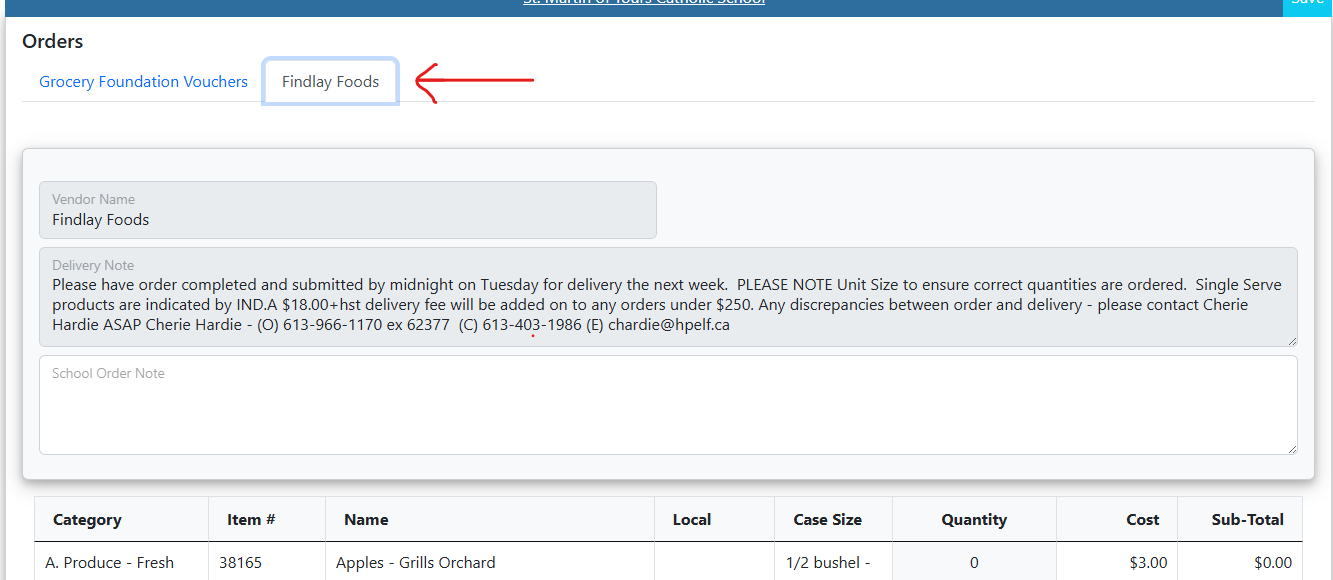
This will take you to the order form. Some schools will have 2 tabs showing Grocery Foundation Voucher and Findlay Food option tab. To place your order from our “Hub”, please select the Findlay Foods tab.
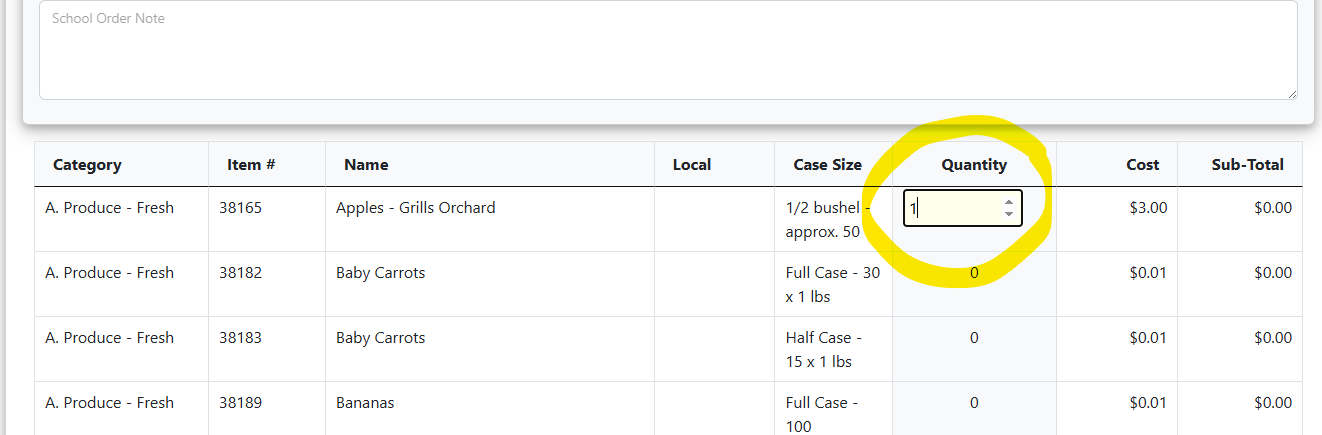
You will see an extensive grocery list organized by food group, with non-food consumable supplies at the bottom. Under Quantity, use the arrow to list the quantity that you would like to order that week. Please pay close attention to case size to help you with your volume. For example, if you enter 2 under quantity of Apples – Grills Orchards you will be receiving approximately 100 apples (NOT 2 apples) – as the description notes , this case size is ½ bushel which is approximately 50 apples.
School Order Note – This is for your use only. Information entered in this section will not be seen by Food for Learning staff in a timely manner. If you require items not on the order form, please email Cherie Hardie at chardie@hpedsb.on.ca with your request.
On the bottom of your order, you will see the approximate cost of your food order for the week. There may be some changes after your order has been submitted (due to fluctuating food costs). These adjustments will be made for you.
Once you have completed your order, click the SAVE and CLOSE button at the top corner of the order form. Please only click the SAVE button once. If there is a delay and you click the SAVE button again, the order will be submitted twice. If you notice that this has happened, please contact Cherie Hardie at chardie@hpedsb.on.ca immediately.

As you submit food orders, the value of each order will be deducted from the amount of funding you have available for hub orders for the year (Hub) and will calculate your remaining balance (Remaining). Please check in frequently to ensure that you do not exceed the funds that have been allotted to your school.

If you have any questions or require assistance with your food order, please contact Cherie Hardie, Food & Logistics Coordinator, at 613-966-1170, ext. 2377.
Monthly Entry
PLEASE REMEMBER
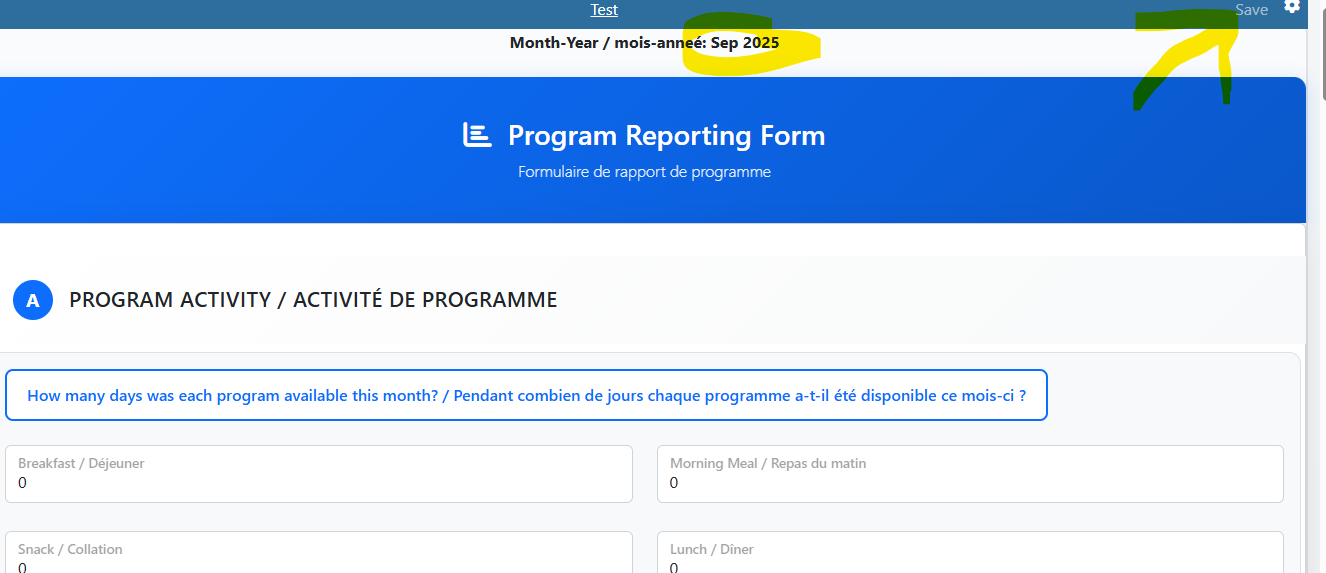
Monthly reports are due the 7th of the month following the month you are reporting for (e.g., If you are reporting for September, your submission is due October 7th.)
PROGRAM ACTIVITY
1) How many days was each program available this month?
Please enter the number of days in the month that each program you are offering was available to students.
2) Number of Meals and Snacks Prepared This Month
Track daily numbers using a tally sheet and add them together at the end of the month.
How to Count:
Snack = 2 Food Categories: Requires 1 fruit/vegetable + 1 other component.
Meal = 3 Food Categories: Requires 1 fruit/vegetable + 1 protein + 1 grain.
Example Calculation: If you put out 50 servings of yogurt (protein), 50 apples (fruit/vegetable), and 50 pieces of toast (grain), you have prepared 50 meals.
FINANCIAL SUMMARY
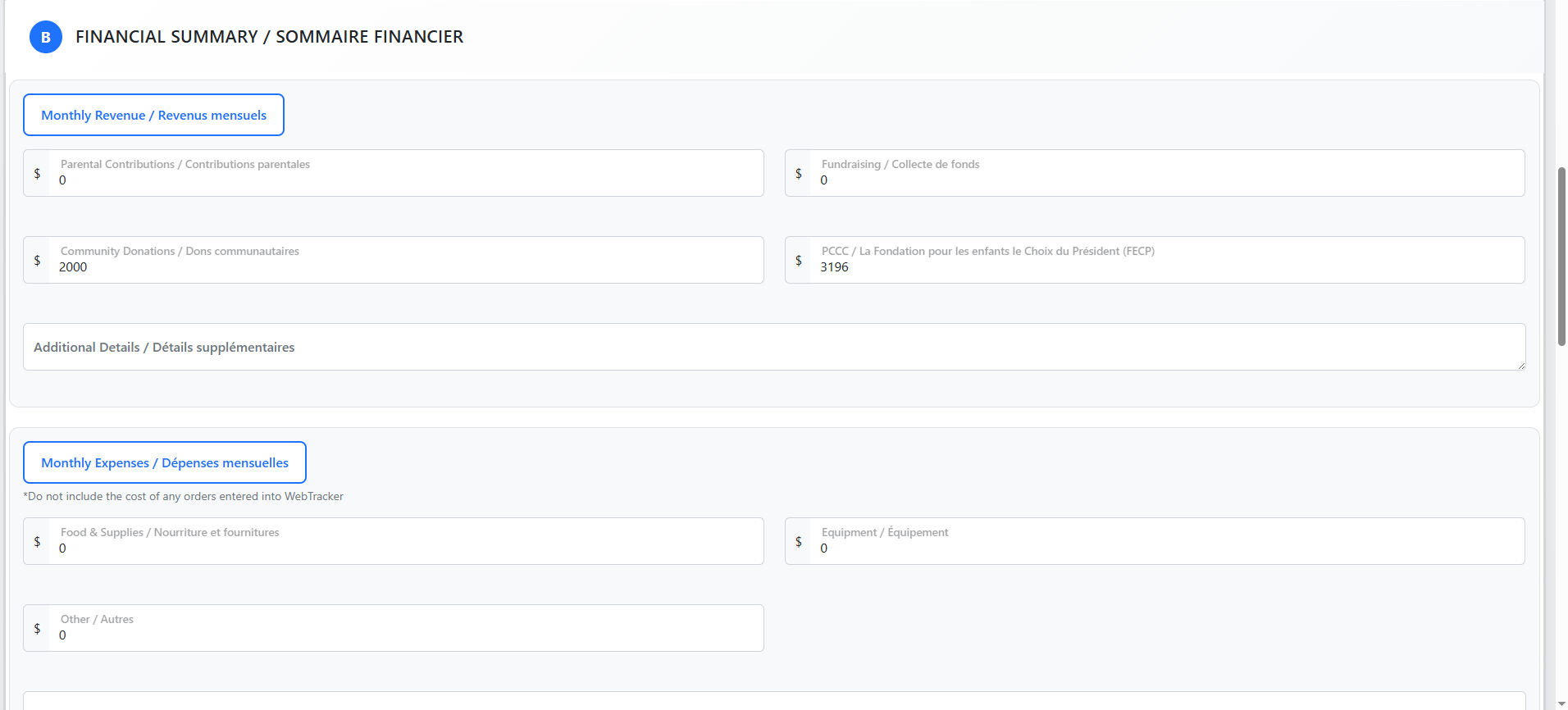
3) Monthly Revenue
Record all revenue received this month using the following guidelines:
-
Cash Revenue: Enter all cash received across the listed sources.
-
In-Kind Donations: Record the value of non-cash donations (such as food donations) in the separate In-Kind Donations section below.
-
FFL Funding: Funding from or through Food for Learning is entered automatically—do not re-enter these amounts.
Checking FFL Payments:
To view payments logged by Food for Learning staff, go to the Client Reports tab in Webtracker and click Monthly Summary. This page is organized into three distinct sections, you will find this information at the bottom of the page.
4) Monthly Expenses
Enter the total amount spent on Food for Learning program food and supplies this month.
-
-
Include: All grocery store purchases.
-
Exclude: Findlay Foods deliveries (tracked automatically via weekly orders).
-
5) In-Kind Donations
“In-kind” refers to non-cash contributions that support your program, such as food or supplies donated by a parent. Please record the estimated dollar value of non-cash contributions to demonstrate community support for your program.
-
-
What to include: Local non-cash donations (e.g., food or supplies donated by parents, businesses, or community members). Always note the donor name and items provided.
-
What to exclude: Food items provided through Food for Learning, such as Reid’s Dairy milk or Breakfast Club of Canada yogurt. These are logged automatically by FFL staff.
-
Tip: To check what staff have already entered, view Client Report, under Monthly report, at the last section of the page (refer to section #3).

PROGRAM VOLUNTEERS
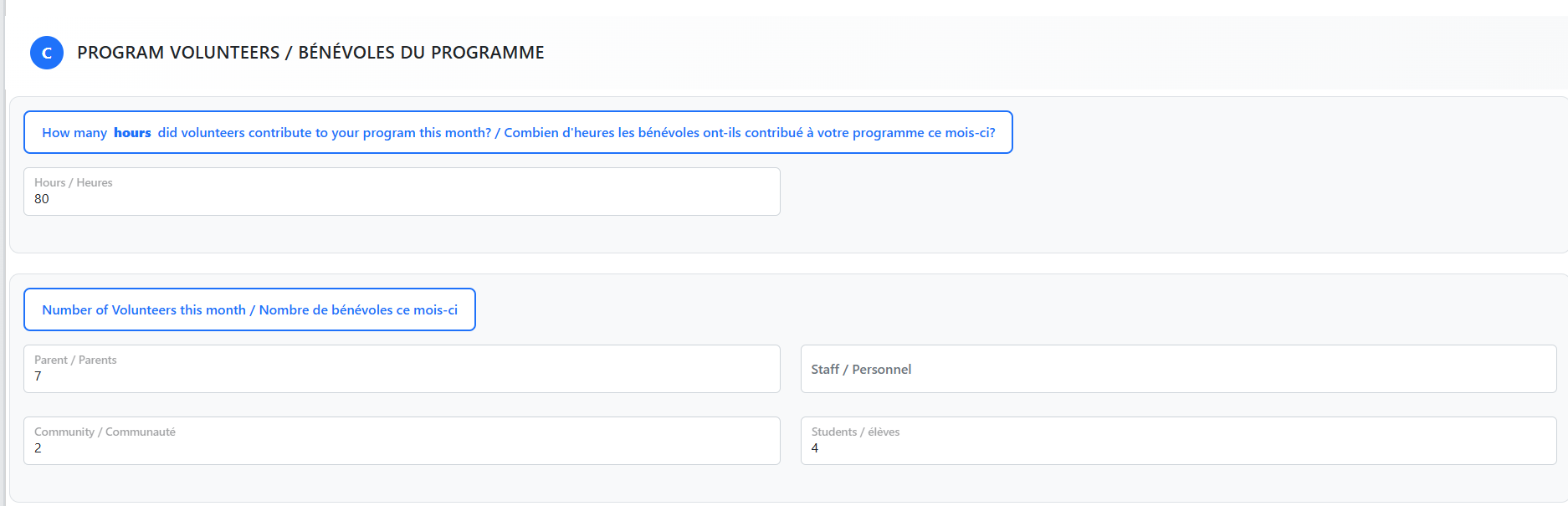
6) How many hours did volunteers contribute to your program this month?
Total hours combined for all people contributing to your program during the month (remember that all people who help with your nutrition program are considered volunteers – they could be teacher’s, EAs, youth workers, community volunteers, parents, students. Include yourself as program coordinator in this count! This will capture the total effort required to operate your Food for Learning programs each month.
7) Number of volunteers this month
There was some confusion with reporting volunteer numbers in the past, so we’ve changed it up and now ask that you report the total number of volunteers each month, including parents, staff, community, students, and most importantly-yourself-the program coordinator!
SIGN OFF
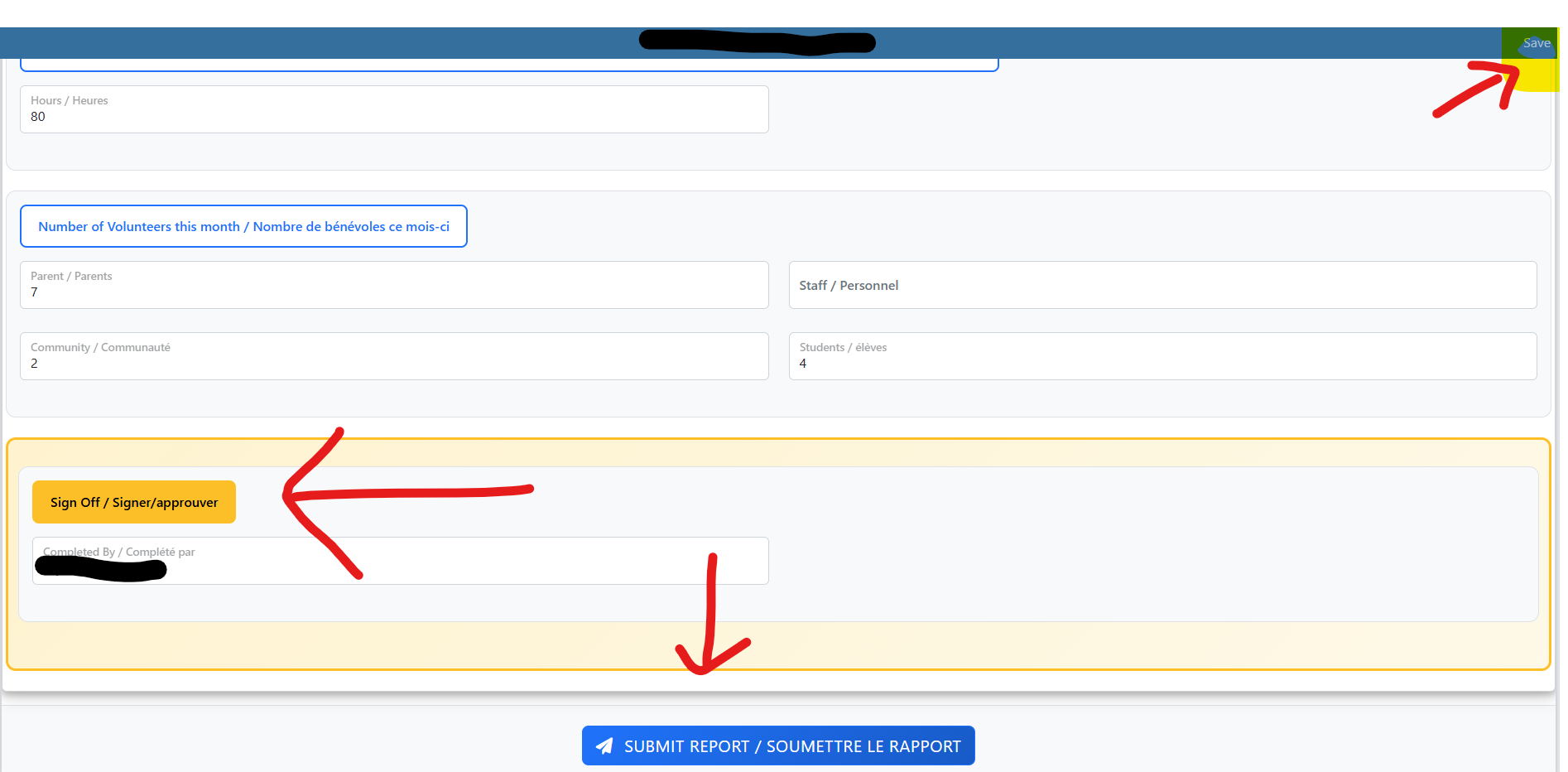
- When all required boxes have been filled, please be sure to provide your name at the bottom of the screen in the Completed By box. This is how Webtracker will recognize that your data has been entered.
- Click Submit Report at the Bottom
- Click Save on top right corner
-
Once complete, you will return to your school’s main page, where your name will appear next to the month you just updated. You may return to edit this month’s data at any time up until the 7th of the following month. After the 7th, monthly reporting locks; you will still be able to view previously entered data, but you will not be able to make direct changes. If you spot an error after the deadline, please contact a Food for Learning staff member to make the correction for you.
Annual Program Renewal
Each school is required to complete and submit a program renewal package in June for the following school year. We will update this page once we know what next years renewal process will look like. Stay tuned.

